

Are you planning to register for BHU UET? Check out the documents required to fill-up the BHU UET Application Form. Also get your hands on the image specifications and important instructions.

- Documents Required for BHU UET 2022 Application Form
- Photograph and Signature Specifications for BHU UET Application Form
- How to Resize Photograph and Signature for BHU UET Application …
- Important Instructions for Uploading Photograph and Signature on BHU UET …
- How to Upload Documents with the BHU UET Application Form?
- Faqs
Filling up the application form of BHU UET 2022 is a smooth process if an individual has kept all the documents ready for the same. Eligible BHU UET candidates also need to make sure that they enter correct and valid information while applying for the desired course. BHU UET 2022 application form is expected to be released in May.

It is vital to be aware of the documents required to fill BHU UET Application Form and their respective specifications. Read on to get your hands on the information regarding the list of documents required for the BHU UET Application Form. Also, check out the specifications and important instructions one needs to keep in mind before submitting the form.
Documents Required for BHU UET 2022 Application Form
While filling the application form for BHU UET 2022, candidates need to keep the following documents handy as given below
Class 10 and 12 mark sheet | Signature of the candidate |
|---|---|
Passport photograph and thumb impression image | Aadhaar Card/Voter ID/Passport |
Credit card and debit card for fee payment | Admit Card issued by the respective Boards (For students appearing in Class 12) |
Bank Passbook | |
Photograph and Signature Specifications for BHU UET Application Form
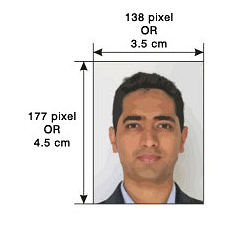
Provided below are the photograph and signature specifications that need to be followed before uploading them in the application form of BHU UET.
Document Name | File Dimension | File Size |
|---|---|---|
Photograph | 100 KB | 4.5 cm x 3.5 cm |
Signature | 100 KB | 4.5 cm x 3.5 cm |
Also Read: BHU UET Exam Day Guidelines - Dos and Don'ts
How to Resize Photograph and Signature for BHU UET Application Form?
Add CollegeDekho as a Trusted Source

Enlisted below are the steps explaining how to resize the image of the photograph and signature so that they easily get uploaded in the application form of BHU UET.
Step 1: Right-click on the image that you want to upload.
Step 2: Select ‘Open with’ and click on ‘Microsoft Office Picture Manager.’
Step 3: Navigate through the top menus and select ‘Picture’
Step 4: Click on ‘Resize’.
Step 5: On the right panel, opt for the radio button to customize the size.
Step 6: Enter the required width and height.
Step 7: Click on ‘Ok’ and save the file.
If you find the above-mentioned steps a little difficult, you can also select the ‘Crop’ option from the ‘Picture’ menu.
Important Instructions for Uploading Photograph and Signature on BHU UET Application Form
Given below are a few important instructions that one must follow while uploading the signature in the application form of BHU UET.
The passport-sized photograph selected by the applicant needs to be recently clicked
The face of the aspirant needs to be clearly visible on the passport-sized photo.
Black and white photos would not be accepted. The passport-sized photograph needs to be coloured.
The signature needs to be done on a plain white sheet of paper.
Candidates need to sign on a white sheet of paper with either a Black or Blue pen.
The scanning resolution of both the photograph and signature must be 100 dpi.
Also Read: Previous Years Question Papers of BHU UET
How to Upload Documents with the BHU UET Application Form?
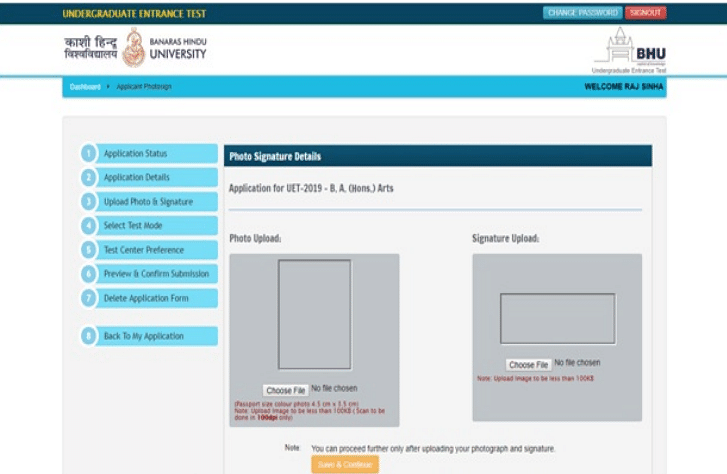
Candidates need to upload the scanned images of their coloured photographs and signature as per the given dimensions.
Cross-check the size and format of the images. Make sure that they follow the aforementioned specifications.
After entering all the application details, you would be asked to upload the photograph and signature.
Click on ‘Choose File’ and browse to the location where the documents are stored.
Select the required file.
Upload both documents separately. Select ‘Save & Continue’.
Applicants can use the MS Office Picture Manager or MS Paint to resize the images. They can also make the necessary changes using any tool available online. It is important to make sure that the candidate follows the specifications and instructions mentioned above completely or else the file will show an error while uploading.
Hope this article helped you in understanding everything about the Documents Required to Fill BHU UET Application Form. If not, feel free to drop your questions at the QnA portal ! Our experts would try to resolve your queries.
Stay tuned to CollegeDekho to get regular information on BHU UET 2022 !
Related Articles | |
|---|---|
Are you feeling lost and unsure about what career path to take after completing 12th standard?
Say goodbye to confusion and hello to a bright future!

FAQs
Yes, the scanning resolution for the images required on the BHU UET application form is 100 dpi.
The images that need to be uploaded on the application form of BHU UET should be of .jpeg format only.
No, an aspirant must upload only a coloured passport size image on the application form of BHU UET.
The file size of the image that needs to be uploaded on the BHU UET Application Form should be not less than 10 KB and not more than 100 KB.
An individual only requires the image of his/her passport size photograph and signature while filling-up the application form of BHU UET.
Was this article helpful?

















Similar Articles
KARTET Answer Key 2025: Release Date, PDF Download Link, Steps to File Objections
AP NMMS Answer Key 2025-26: Release Date, PDF Download Link All Sets, Steps to File Grievances
AP NMMS Result 2025-26: Release Date, Steps to Download Merit List cum Card, District-wise Selected List
KARTET Result 2025: Expected Date, Qualifying Marks, Steps to Download KARTET scorecard, certificate
AFCAT 2026 Application Form Correction - Dates, Process, How to Edit
LPUNEST Last Minute Tips - Follow These Tips for A Good Score