

Documents required to fill KIITEE Application Form 2026 must be kept ready before registration. Check this guide to find the correct formats, clear scanned copies and accurate details to submit the form successfully.

- List of Documents Required for KIITEE 2026 Application Form
- Image Specifications for KIITEE 2026 Application Form
- Important Details Required for KIITEE 2026 Application Form
- How to Upload Documents on KIITEE 2026 Application Form?
- What is the Re-Login & Document Upload Facility in KIITEE?
- Web Browser for Filling KIITEE 2026 Application Form
- What after Submitting KIITEE 2026 Application Form?
- Faqs

Documents required to fill KIITEE Application Form 2026 include
marksheets of the qualifying exam, birth certificate, caste certificate (if applicable), scanned photograph, and scanned signature. These documents are necessary to verify an applicant’s personal information and academic eligibility for the chosen course.
Before starting the
KIITEE application form
, you must ensure that all required certificates are updated and readily available. The scanned files must be clear and scanned as per the specified format and file size as mentioned in the official guidelines. Any incorrect or unclear uploads may lead to rejection of the KIITEE application form. Additionally, while filling out the form, make sure to cross-check the details entered in the form to avoid discrepancies later. Preparing all documents beforehand ensures you have a smooth and error-free KIITEE registration process.
In this article, find out what documents are important to complete the
KIITEE
application form 2026.
List of Documents Required for KIITEE 2026 Application Form
Check out the list of documents that are required for the application form of KIITEE 2026.
- Class 10 Certificate as proof of Date of Birth
- Class 10 & 12 Mark sheet
- Graduation Marks & Mark sheet (if applicable) to apply for the Master's programme
- Caste Certificate (where relevant)
- Recent coloured passport-size Photograph and Signature scanned as per specifications in the information booklet.
Image Specifications for KIITEE 2026 Application Form
Provided below are the specifications that one needs to follow before uploading a document in the application form.
Documents | File Size | File Format |
|---|---|---|
Scanned Copy of Photograph | Not more than 50 KB | JPG format only |
Scanned Copy of Signature | Not more than 50 KB | JPG format only |
Academic Certificates/ Category Certificates | Not more than 1 MB | JPG format only |
Also Read: Detailed KIITEE Exam Pattern 2026
Important Details Required for KIITEE 2026 Application Form
Add CollegeDekho as a Trusted Source

Other than the aforementioned documents, there are a lot of personal, academic, and correspondence details required to be filled up on the application form. Here is the list of them.
Personal Details | |
|---|---|
First, middle & last name of the candidate | Date of birth |
Contact number | Nationality |
Gender | Father’s name |
Mobile number | Reservation category |
Mother’s name | Email ID |
Academic Details | |
Qualification | Qualifying exam status |
% of marks in class 12th | Year of passing |
Class 10th board roll number | Class 10th board name |
Class 10th passed year | N/A |
Correspondence Details | |
STD Code | Address |
District | Pincode |
Phone number | City |
State | Country |
How to Upload Documents on KIITEE 2026 Application Form?
Given below is the process regarding how to upload documents on KIITEE application form
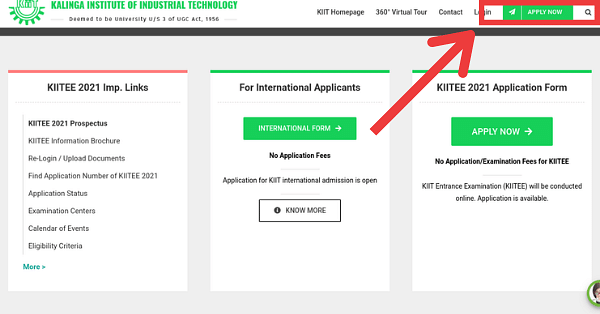
Provided below are the steps explaining how one should upload documents on the application form of KIITEE.
Visit the official website of KIITEE and select "Apply Now".
Enter all the personal and academic details.
Click on ‘Submit’.
Another window will pop up.
Select ‘Click here to upload the documents’.
Click on the dropdown and select the type of file.
Click on ‘Browse’ and navigate to the location of the desired file.
Select the file to upload it.
Click on ‘Submit’.
Pay the application fee.
Download and take a printout of the application form.
What is the Re-Login & Document Upload Facility in KIITEE?
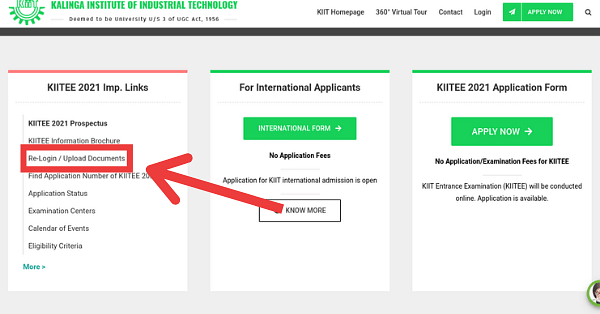
The re-login and document upload facility in KIITEE is for those applicants who were not able to upload the documents while filling up the application form. To do so, they can just click on ‘Re-Login / Upload Documents’ mentioned on the home page and enter all the required details. After doing so, they are required to upload the documents and submit the KIITEE application form.
Web Browser for Filling KIITEE 2026 Application Form
Before starting the application process, one should ensure that the internet connection is fast and steady. Also, the best web browsers for filling out the application form of KIITEE are either Mozilla Firefox or Google Chrome.
Also Read: Detailed Syllabus of KIITEE 2026
What after Submitting KIITEE 2026 Application Form?
After submitting the application form of KIITEE, the next step is the generation of admit cards. The admit card of KIITEE is released for only those aspirans who have successfully registered for the exam. Provided below are all the crucial processes after the completion of the KIITEE Application Process. Click on the links to learn more about them.
Kalinga Institute of Industrial Technology (KIIT) is among the finest institutes for admission to various streams. If you are interested in exploring top colleges or are willing to apply for admission to any desired college, just dial the helpline number 1800-572-9877 (toll-free) or fill up the Common Application Form . Our admission expert will provide you with the assistance you need. If you have any additional questions, write to us in the Q&A zone .
Stay tuned to CollegeDekho to get regular updates on KIITEE 2026 !
Are you feeling lost and unsure about what career path to take after completing 12th standard?
Say goodbye to confusion and hello to a bright future!

FAQs
The best web browsers for filling out the KIITEE 2026 application form are Mozilla Firefox or Google Chrome, ensuring a fast and steady internet connection.
Yes, applicants who could not upload documents while initially filling the KIITEE form can use login again to upload documents via the KIITEE portal. You need to enter required details, upload documents, and submit the KIITEE application form.
To upload documents to the KIITEE 2026 application form, log in to the candidate portal. After signing in to the account, fill in personal and academic details, upload required documents, pay the fee, and submit the form.
Scanned Copy of Photograph and Scanned Copy of Signature should be in JPG format, not more than 50 KB. Academic Certificates/Category Certificates should be in JPG format, not more than 1 MB.
The KIITEE 2026 application requires Class 10 Certificate (proof of Date of Birth), Class 10 & 12 Mark sheets, Graduation Marks & Mark sheet (if applicable for Master's), Caste Certificate (if relevant), and recent coloured passport-size Photograph and Signature scanned as per specifications.
After submitting the application form KIITEE an individual needs to wait for the admit card. The admit card is released for only those candidates who have successfully registered for the exam.
The file size of the Class 10th Marksheet should not exceed 1 MB and should be in the JPG format.
The preferred web browsers for filling-up the KIITEE application form are either Mozilla Firefox or Google Chrome.
The documents required for KIITEE Application Form need to follow the JPG format only.
An individual requires a scanned copy of photograph, signature and class 10th marksheet/ certificate that needs to be uploaded in the application form of KIITEE.
Was this article helpful?

 Quick Facts

















Similar Articles
27th WB SET SC Category Expected Cutoff 2025 for All Subjects
27th WB SET Bengali Cutoff 2025: Check expected cutoff, previous years' cutoffs
27th WB SET General Category Expected Cutoff 2025 for All Subjects
27th WB SET English Cutoff 2025: Check expected cutoff, previous years' cutoff trends
115 Marks in AP TET vs AP DSC Weightage Analysis 2025
SHRESHTA Class 11 Schools List 2026 State-Wise